Table of Contents
Discover Newsletter SMS – a tool for collecting contact data for SMS communication. Build a form, generate a code or QR code, and grow your subscriber base.
What is an SMS Newsletter?
Newsletter SMS is a tool for collecting customer data for SMS communication purposes. The sign-up form is fully editable – you can customize both the fields and its appearance. All entries collected this way are sent to the selected group in your SMSAPI contact database. Below you’ll find an example of a ready-made SMS Newsletter form.
Why use Newsletter SMS?
Your own phone number database is one of the most valuable assets in marketing. With SMS Newsletter, you build a direct communication channel with customers — independent of social media algorithms or rising advertising costs. Once you’ve acquired a contact, you can use it for promotions, showcasing new products, events, or other important updates.
SMS Newsletter also helps you communicate in compliance with regulations. The form collects marketing consents, and phone number verification via SMS code improves the quality of your recipient database. Only genuinely interested people end up on it, which translates into higher campaign effectiveness and better sales results.
Three benefits of SMS Newsletter
- Acquire new subscribers legally — the form collects marketing consents in line with GDPR.
- Match the form to your brand — fully customize the fields, copy, and design to keep your communication consistent.
- Collect contacts wherever your customers are — share the form on your website, on social media, in printed materials, or via a QR code.
How to set up Newsletter SMS?
Start by logging into your SMSAPI client panel. You’ll find SMS Newsletter under the Additional Features menu.
In the settings tab, you can customize the form fields, where contacts are collected, and the content of automated messages. Adapt the newsletter to fit your SMS campaigns. Next, move on to Consents. There you can create consent statements, add a note under the form, or include information for your privacy notice.
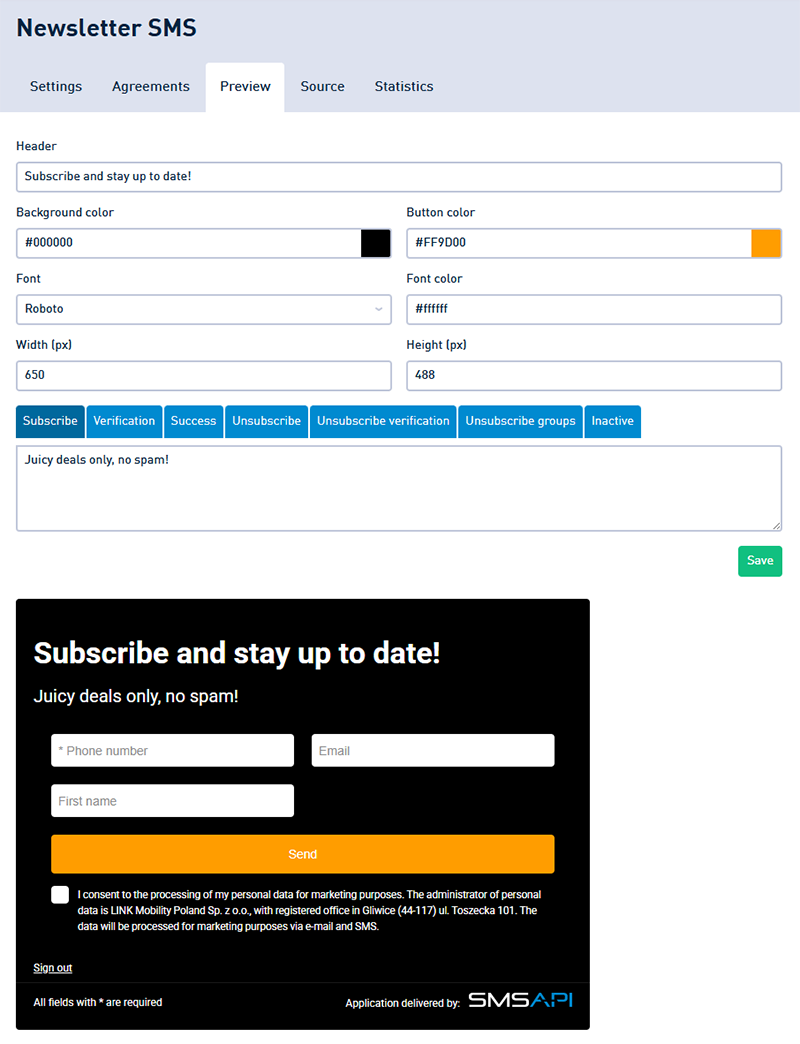
The Preview tab is where you’ll design the look of the form. Set the background color, text color, button color, and font. This is also where you’ll set the message content.
How to collect contacts using SMS Newsletter?
You can embed the finished form on your website, in an email or SMS message, or in printed materials. Go to the Source tab to get the link, QR code, or ready-made code snippets. Use SMS Newsletter wherever your customers are.