SMSAPI MCP Server – Bring SMS messaging capabilities to your AI agents and automation workflows.
1. Introduction – AI as the New Interface for SMS Services
AI agents are increasingly becoming the new way we interact with digital tools and services. Instead of manually performing tasks across various platforms, users can simply instruct an AI agent, which then independently triggers the appropriate tools and integrations.

Check the SMSAPI Documentation
Click the button below to view the full SMSAPI MCP Documentation.
This also applies to customer communication. AI can analyze system events, respond to them, and automatically send notifications. To make this possible, AI models require a standardized method to communicate with external services—such as SMS delivery platforms.
This is precisely why the Model Context Protocol (MCP) was created. Thanks to MCP, AI tools can leverage the capabilities of platforms like SMSAPI in a structured and secure manner.
2. What is MCP (Model Context Protocol)?
The Model Context Protocol (MCP) is an open standard that enables AI models and agents to use external services through a unified interface. In practice, MCP acts as a middleware layer between the AI agent and the external system—for example, an SMS delivery platform. Instead of building a custom integration for every single AI tool, a service can provide an MCP server that presents its functionalities as a set of tools. This makes integrating with the service much simpler and more universal.

What can an AI agent do?
- Discover available features,
- Select the correct tools,
- Trigger tools and functions at the right moment.
3. Why SMS Communication Fits Perfectly with AI Agents
SMS remains one of the most direct and effective communication channels with users.
Business use cases for SMS include:
- Sending verification codes (OTP and 2FA SMS),
- SMS notifications about order statuses, deliveries, returns, and complaints,
- Appointment reminders,
- System alerts,
- SMS marketing.
In many business processes, the exact timing of an SMS depends on a specific event—such as an order status change or a detected system anomaly. AI agents are perfectly suited to handle such scenarios.
What are the advantages of an AI agent?
- Simultaneous data analysis from multiple systems,
- Real-time decision-making,
- Automatic execution of appropriate actions.
In this model, SMS becomes a natural component of automated workflows.
4. SMSAPI MCP Server – What is it?
The SMSAPI MCP Server exposes the features of the SMS API platform via the MCP protocol, making them accessible to AI agents and developer tools that support MCP. In practice, this means an AI agent can directly perform operations related to sending SMS messages using a set of tools provided by the MCP server.
Full SMSAPI MCP Documentation: https://www.smsapi.com/docs/mcp/
Instead of creating separate integrations for every AI environment, SMSAPI functionalities are available in a standardized format. This allows SMS to become an integral element of intelligent automations built with AI.
5. SMSAPI MCP Server Features
The MCP server for SMSAPI provides a comprehensive set of features related to SMS communication.
SMS Messaging
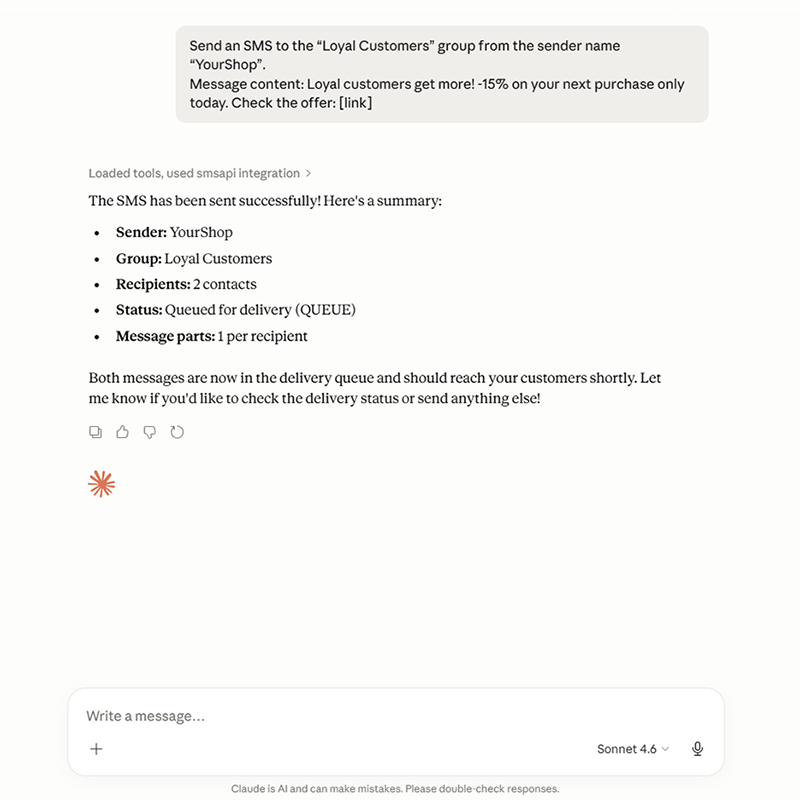
AI agents can send SMS messages in response to specific events or user actions.
What kind of SMS messages can an AI agent send?
- Transactional notifications
- System alerts
- Informational messages
- Customer communication
Example: Sending an SMS with Claude
Checking Delivery Status
An AI agent can verify whether a message has been successfully delivered to the recipient. This allows for the creation of more advanced automation scenarios.
Example use cases for checking delivery status:
- Retrying failed SMS deliveries
- Sending a notification via an alternative channel
- Logging the status directly in a CRM system
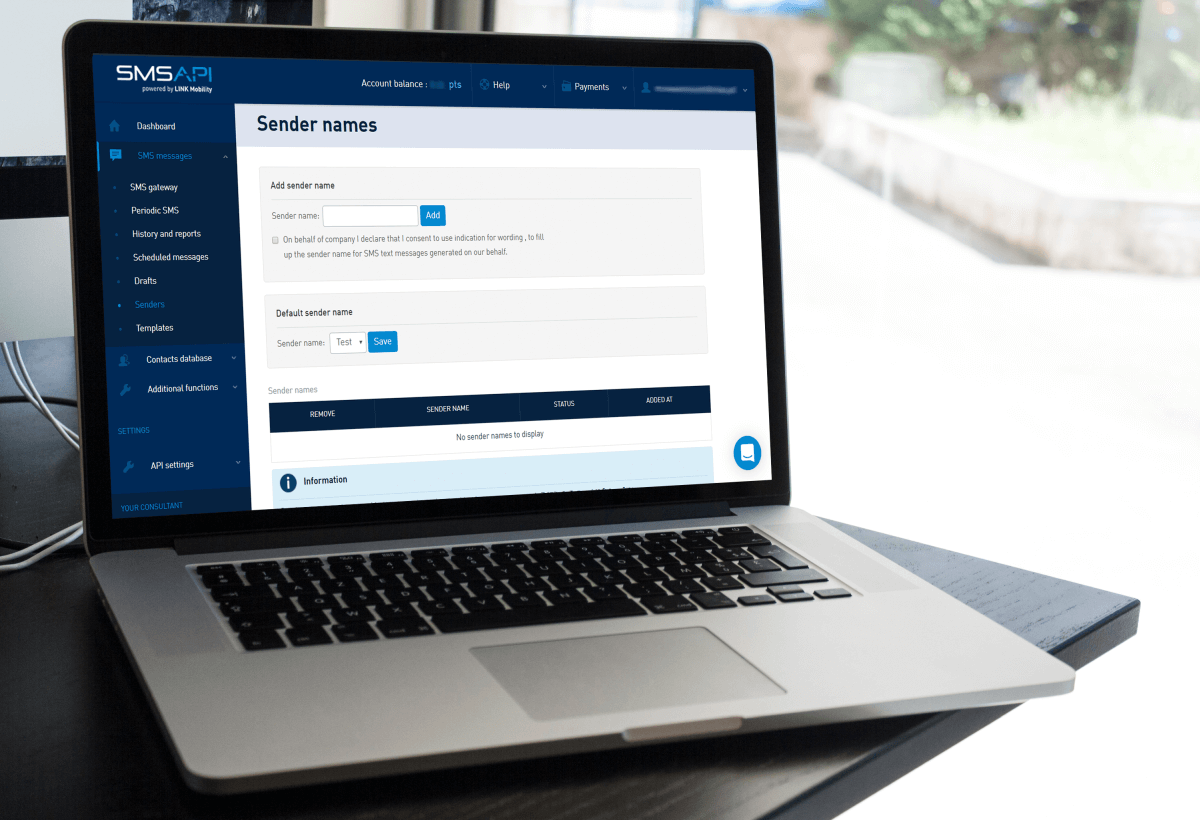
Sender Name Management
The system can configure the sender ID (SMS Alpha Sender ID) used for sent messages. This ensures that your SMS communication remains consistent with your brand identity.
📖 Read more about SMS Branding:
Access to Account Information
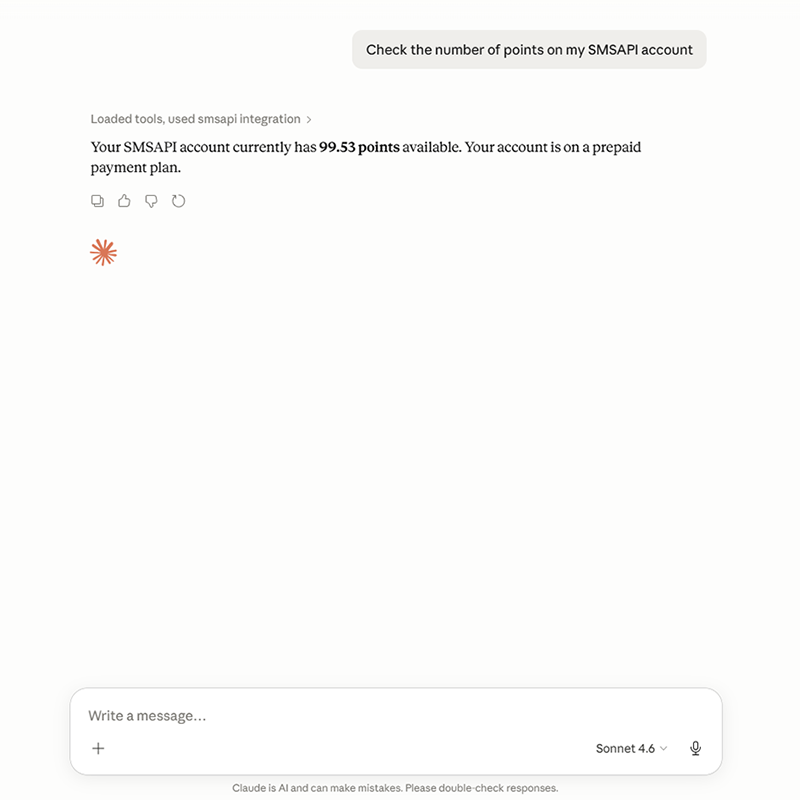
An AI agent can retrieve account balance details and message usage statistics, enabling effective cost monitoring and service utilization tracking.
6. Example Use Cases for SMS in AI Automations
Integrating SMSAPI with AI agents opens up a wide range of new possibilities for automated communication.
Order Status Notifications
An AI agent can monitor order status changes within an e-commerce platform and automatically dispatch an SMS to the customer as soon as their package is shipped or delivered.
Operational Alerts for Teams
If an infrastructure anomaly or system issue is detected, the AI agent can immediately broadcast an urgent SMS alert to system administrators or the on-call DevOps team.
Appointment Reminders
An AI-driven booking system can seamlessly send automated SMS reminders to users prior to their scheduled visits, consultations, or meetings.
Verification Codes and Security
An AI agent can trigger the instant delivery of One-Time Passwords (OTP) during secure login flows or critical transaction confirmations.
Automated Customer Communication
An AI agent handling customer support can proactively send SMS updates regarding support ticket status changes or requests for additional information.
Test SMSAPI
Create a free account at SMSAPI and test the professional SMS gateway for companies.
7. How the AI and SMS API Integration Works
The integration relies on a straightforward communication model. The AI agent sends a request to the MCP client, which communicates with the SMSAPI MCP server. The MCP server then translates this request into the appropriate SMSAPI API call. This allows the AI agent to utilize SMS messaging features without needing a direct integration with the API itself.
What is the workflow of the AI and SMSAPI integration?
AI Agent ↔️ MCP client ↔️ SMSAPI MCP Server ↔️ SMSAPI API
8. Configuration and Authorization of the AI Connection with SMS API
Prerequisites
Before starting the configuration, make sure you have:
- An active SMSAPI account – if you don’t have one yet, register a business account.
- An MCP client – an installed application that supports MCP, such as Claude Desktop or Cursor.
- Node.js 18+ installed.
- Selected authorization method:
- OAuth 2.0 webflow (recommended) — the MCP client automatically performs authorization via a browser. Log in to SMSAPI and grant access to your account. The token is refreshed automatically. Configuration only requires providing the server URL without an Authorization header.
- An OAuth2 token – generated in the SMSAPI Customer Panel (API Settings -> OAuth Tokens section).
Authorization and Scopes
The MCP server uses authorization based on the SMSAPI OAuth2 token. When generating the token, you must select the appropriate scopes depending on which tools the AI agent needs to access:
| Feature | Required Scope |
| SMS | sms |
| Contacts | contacts |
| Account / Balance | profile |
| Subusers | subuser |
| Short URL | short_url |
| HLR | hlr |
| Blacklist | blacklist |
| Sender Names | sms_sender |
Tip: We recommend following the principle of least privilege—if the agent is only meant to send notifications, granting access to sms is sufficient.
Transport
The SMSAPI MCP Server is hosted as a service at mcp.smsapi.io. The server utilizes Streamable HTTP transport—the latest standard in MCP communication. MCP clients that support this transport connect directly to the server over HTTP, eliminating the need for additional bridges or proxies.
Compatible MCP Clients
The SMSAPI MCP Server works seamlessly with any client that supports Streamable HTTP transport, including:
- Desktop apps: Claude Desktop, Cursor, VS Code (GitHub Copilot)
- CLI tools: Claude Code, OpenAI Codex CLI
- Agent frameworks: LangChain, OpenAI Agents SDK, Semantic Kernel, Spring AI
Token Security—Best Practices
- Never hardcode the OAuth2 token directly into your source code or repository.
- Use environment variables to securely store the token.
- Apply the principle of least privilege—only grant the token the scopes necessary for the task.
Claude Desktop MCP Configuration
1. Install Node.js 18+.
2. Open Claude Desktop and go to Settings (gear icon).
3. Select the Developer tab, then click Edit Config to open the claude_desktop_config.json file.
4. Choose authorization method:
a) OAuth Webflow authorization: add the SMSAPI MCP server configuration after comma and before last closing bracket:
{
  "mcpServers": {
    "smsapi": {
      "type": "http",
      "url": "https://mcp.smsapi.io/",
      "headers": {
        "Authorization": "Bearer YOUR_OAUTH2_TOKEN"
      }
    }
  }
}
Save the file. Go to Connectors tab, find SMSAPI and click Connect. Authorize access.
b) Static token authorization: add the SMSAPI MCP server configuration after comma and before last closing bracket
{
  "mcpServers": {
    "smsapi": {
      "command": "npx",
      "args": [
        "-y",
        "mcp-remote",
        "https://mcp.smsapi.io/",
        "--header",
        "Authorization:${AUTH_HEADER}"
      ],
      "env": {
        "AUTH_HEADER": "Bearer YOUR_OAUTH2_TOKEN"
      }
    }
  }
}
Remember to replace the YOUR_OAUTH2_TOKEN with a token generated in the SMSAPI Customer Portal (API token tab). Save the file.
5. Restart Claude.
6. Once restarted, click the “+” icon in the lower-left corner, then select Connectors → Manage connectors—you should see the list of SMSAPI tools.
Cursor Configuration
1. Open Cursor and go to Cursor Settings (Ctrl+Shift+J or via the menu).
2. Select MCP from the sidebar menu.
3. Click Add new global MCP server.
4. In the mcp.json file, add the following configuration:
{
  "mcpServers": {
    "smsapi": {
      "type": "http",
      "url": "https://mcp.smsapi.io/",
      "headers": {
        "Authorization": "Bearer YOUR_OAUTH2_TOKEN"
      }
    }
  }
}
5. Save the file—Cursor will automatically detect the new server.
6. Ensure that a green status indicator and the list of available tools appear next to the server name.
Claude Code Configuration (CLI)
Add the server using a single command in your terminal:
claude mcp add smsapi \
  --transport http \
  https://mcp.smsapi.io/ \
  --header "Authorization: Bearer YOUR_OAUTH2_TOKEN"
Once added, the server will be automatically available in all subsequent Claude Code sessions.
Clients without Remote MCP Support (STDIO bridge)
If your MCP client does not support direct HTTP connections, you can use the mcp-remote bridge (requires Node.js 18+):
{
  "mcpServers": {
    "smsapi": {
      "command": "npx",
      "args": [
        "-y",
        "mcp-remote",
        "https://mcp.smsapi.io/",
        "--header",
        "Authorization:${AUTH_HEADER}"
      ],
      "env": {
        "AUTH_HEADER": "Bearer YOUR_OAUTH2_TOKEN"
      }
    }
  }
}
Limiting Access to a Specific Group of Tools
If you want the AI agent to only access a specific set of features (e.g., only SMS functions), use a group endpoint:
{
  "mcpServers": {
    "smsapi-sms": {
      "type": "http",
      "url": "https://mcp.smsapi.io/sms/",
      "headers": {
        "Authorization": "Bearer YOUR_OAUTH2_TOKEN"
      }
    }
  }
}
This passes a smaller footprint of tools to the agent, reducing token consumption and improving the accuracy of tool selection by the AI model.
Attention!
Replace YOUR_OAUTH2_TOKEN with your actual token generated in the Customer Panel. Restart your MCP client after making any changes to the configuration.
9. Endpoints and Features
The SMSAPI MCP server is divided into functional groups, each available under a separate endpoint. This allows for precise permission management for your AI agents (following the principle of least privilege).
| Group (Server) | Endpoint | Features |
| All | / | Full access to all server tools. |
| SMS | /sms | Message sending (single, group, scheduled), checking delivery status, and canceling scheduled campaigns. |
| Contacts | /contacts | Full contact database management: creating, editing, deleting contacts, contact groups, and custom fields. |
| Account | /account | Checking account balance, managing sender names (listing, creating, deleting, and setting the default sender name). |
| Subusers | /subusers | Subuser account management: listing, viewing details, creating, editing, and deleting. |
| Short URL | /short-url | Managing shortened links (cut.li) and retrieving click statistics. |
| HLR | /hlr | Checking phone numbers in the HLR (Home Location Register) database. |
| Blacklist | /blacklist | Managing the blacklist of phone numbers: listing, adding, and removing. |
10. Example Prompts
Once connected to the MCP server, you can simply describe what you want to achieve using natural language. Here are a few examples of prompts you can use:
Sending an SMS
Send an SMS to number 48123456789 with the message: 'Your order #12345 has been shipped. Estimated delivery: tomorrow by 6:00 PM.'
Checking Account Balance
Check how many points I have left in my SMSAPI account.
Sending to a Contact Group
Send an SMS to all contacts in the 'VIP Customers' group with the message: 'Join us for an exclusive -30% flash sale today only!'
Contact Management
Add a new contact: John Doe, number 48111222333, email john@example.com. Then, assign him to the 'Newsletter' group.
Checking Message Status
Check the delivery status of the SMS with ID abc123.
Scheduling a Message
Schedule an SMS to 48123456789 with the message: 'Reminder: You have an appointment at the clinic tomorrow at 10:00 AM.' Set it to send today at 6:00 PM.
Number Validation
Check if the number 48123456789 is active using an HLR lookup.
Blacklist Management
Add the number 48999888777 to the blacklist so they don't receive any more messages.
11. How to Get Started with MCP in SMSAPI?
The fastest way to get up and running is to use the public server instance:
- Generate an OAuth2 token with the required scopes in your SMSAPI Customer Panel.
- Configure the server connection in your preferred MCP client (e.g., Claude Desktop) – see Section 8: Configuration and Authorization of the AI Connection with SMS API.
- Once connected, the AI agent will automatically gain access to the selected tools.
Check the SMSAPI Documentation
Click the button below to view the full SMSAPI MCP Documentation.
12. Troubleshooting
| Issue | Cause | Solution |
| AI agent cannot see SMSAPI tools | Incorrect MCP client configuration | Verify the server URL and ensure the token is correctly formatted in the config file. |
| Authorization error (401) | Invalid or expired OAuth2 token | Generate a new token in the SMSAPI Customer Panel. |
| Permission error (403) | Token is missing the required scopes | Generate a new token with the appropriate permissions (see the scopes table). |
| SMS was not sent | Insufficient account points or invalid phone number | Check your account balance and verify the number format (it must include the country code, e.g., 48 for Poland). |
| Agent uses the wrong sender name | Sender name was not specified in the prompt | Specify the preferred sender name directly in your prompt or set up a default sender name in your panel. |
| Connection timeout | Network issue or server unavailable | Check your internet connection and verify the service status. |
13. What’s Next – AI and the Future of Business SMS Communication
The rapid evolution of AI agents means that an increasing number of business processes can be fully automated and managed by intelligent systems. Customer communication remains a critical pillar of these workflows.
With the SMSAPI MCP Server, sending SMS messages becomes a native component of automated workflows driven by AI. This is just the beginning of integrating text messaging communication into the newly emerging ecosystem of artificial intelligence tools.
Test SMSAPI
Create a free account at SMSAPI and test the professional SMS gateway for companies.