Table of Contents
A client books a haircut for Thursday at four. Thursday comes, they don’t show up, and they don’t call. The slot sits empty. The stylist gets paid either way. The revenue is gone.
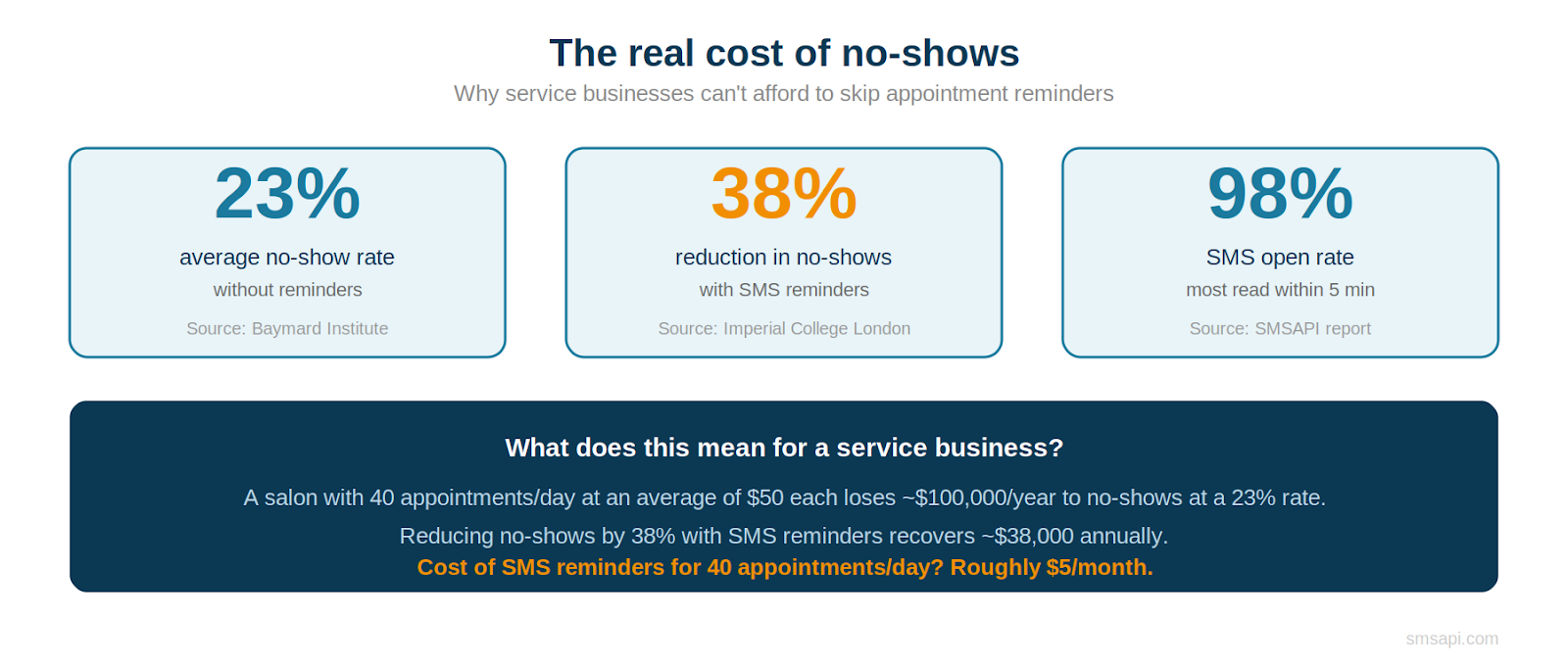
If you run a service business – a salon, a dental practice, a tyre shop, a personal training studio, a veterinary clinic – you know this scenario. You probably know it well enough to have a name for it: a no-show. And you probably know that no-shows aren’t rare. Research puts the average no-show rate for service businesses at around 23% when no reminders are sent. That’s nearly one in four appointments, evaporating.

Test SMSAPI
Create a free account at SMSAPI and test the professional SMS gateway for companies.
The fix is surprisingly simple and well-documented. A single SMS reminder sent before the appointment reduces no-shows by up to 38%, according to a study by Imperial College London. Text messages have a 98% open rate, and most are read within five minutes of delivery. No other channel comes close. Not email (which often goes unread for hours), not phone calls (which go to voicemail), and certainly not a paper card handed out at the reception desk. If you’d like to understand the broader role of SMS in business communication, we’ve covered the fundamentals separately.
This article is a practical guide to implementing SMS appointment reminders in your service business. We’ll cover the reminder sequence that works, industry-specific examples, the GDPR angle, two-way messaging for confirmations and rescheduling, and how to set all of it up in SMSAPI.
The appointment SMS sequence that actually works
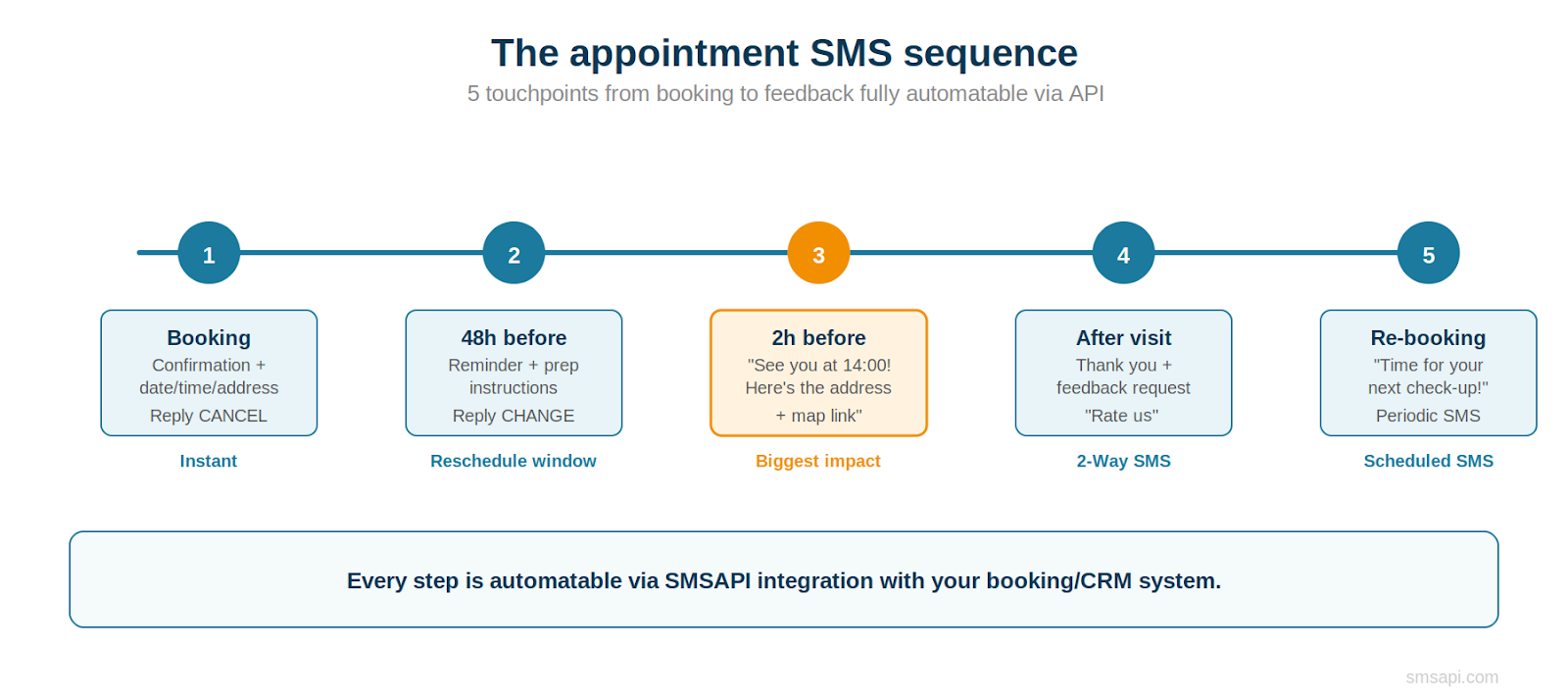
The biggest mistake businesses make with appointment reminders is treating them as a single message. One text the day before is better than nothing, but a structured sequence – from booking confirmation to post-visit follow-up – does more than just reduce no-shows. It builds a communication rhythm that keeps your business present in the customer’s mind. All of these can be automated via SMSAPI’s API integration with your booking or CRM system.
Step 1: Booking confirmation (instant)
The moment a customer books, send a confirmation SMS with the date, time, location, and the name of the service provider (the stylist, the doctor, the trainer). This isn’t just a courtesy – it’s the first touchpoint that anchors the appointment in the customer’s mind. Include a short instruction: ‘Reply CANCEL if you need to change your plans.’
Using a branded SMS sender name (e.g., ‘ElCepillo’ instead of a random number) increases recognition and trust. SMS branding is free in SMSAPI and takes the company name from a generic number to a recognisable brand in the recipient’s inbox.
Step 2: Reminder with prep instructions (48 hours before)
Two days before the appointment, send a reminder that adds value beyond just the date and time. Include preparation instructions relevant to the service: ‘Please arrive 10 minutes early for paperwork’ (dental), ‘Come with clean, dry hair’ (salon), ‘Bring your previous prescription’ (optician). If you’ve set up two-way SMS messaging, this is also the moment to offer a reschedule option: ‘Reply CHANGE to pick a new time.’ This is crucial – a rescheduled appointment is infinitely better than a no-show, because you recover the slot for someone else.
Step 3: Day-of reminder (2 hours before)
This is the highest-impact message in the sequence. Research shows that same-day reminders catch the largest number of people who would otherwise forget or get distracted by their day. Keep it short, warm, and actionable: include a link to a map if the location is hard to find. Use SMSAPI’s short link feature (cut.li) to keep the message within the 160-character limit while still providing navigation, and to track click-through rates.
Step 4: Post-visit thank you and feedback (1–2 hours after)
The appointment is over, but the communication doesn’t have to be. A short thank-you SMS with a feedback request (‘How was your visit? Reply 1–5’) turns a transactional interaction into a relationship-building moment. This is where SMSAPI’s two-way SMS capability shines – customers can reply directly, and you capture satisfaction data without requiring them to visit a separate survey link. Low scores can trigger an immediate follow-up call from the manager.
Step 5: Re-booking reminder (periodic)
Many service businesses depend on recurring visits: haircuts every six weeks, dental check-ups every six months, tyre changes twice a year. Using SMSAPI’s scheduled SMS feature, you can set up periodic reminders that automatically prompt customers to re-book when their next appointment is due. This turns a passive client database into an active revenue driver.
SMS reminder examples by industry
The principles are universal, but the wording matters. A dental clinic and a tyre shop have different customers with different expectations. Here are concrete examples across six service industries – each using personalisation parameters that SMSAPI fills automatically from your database.
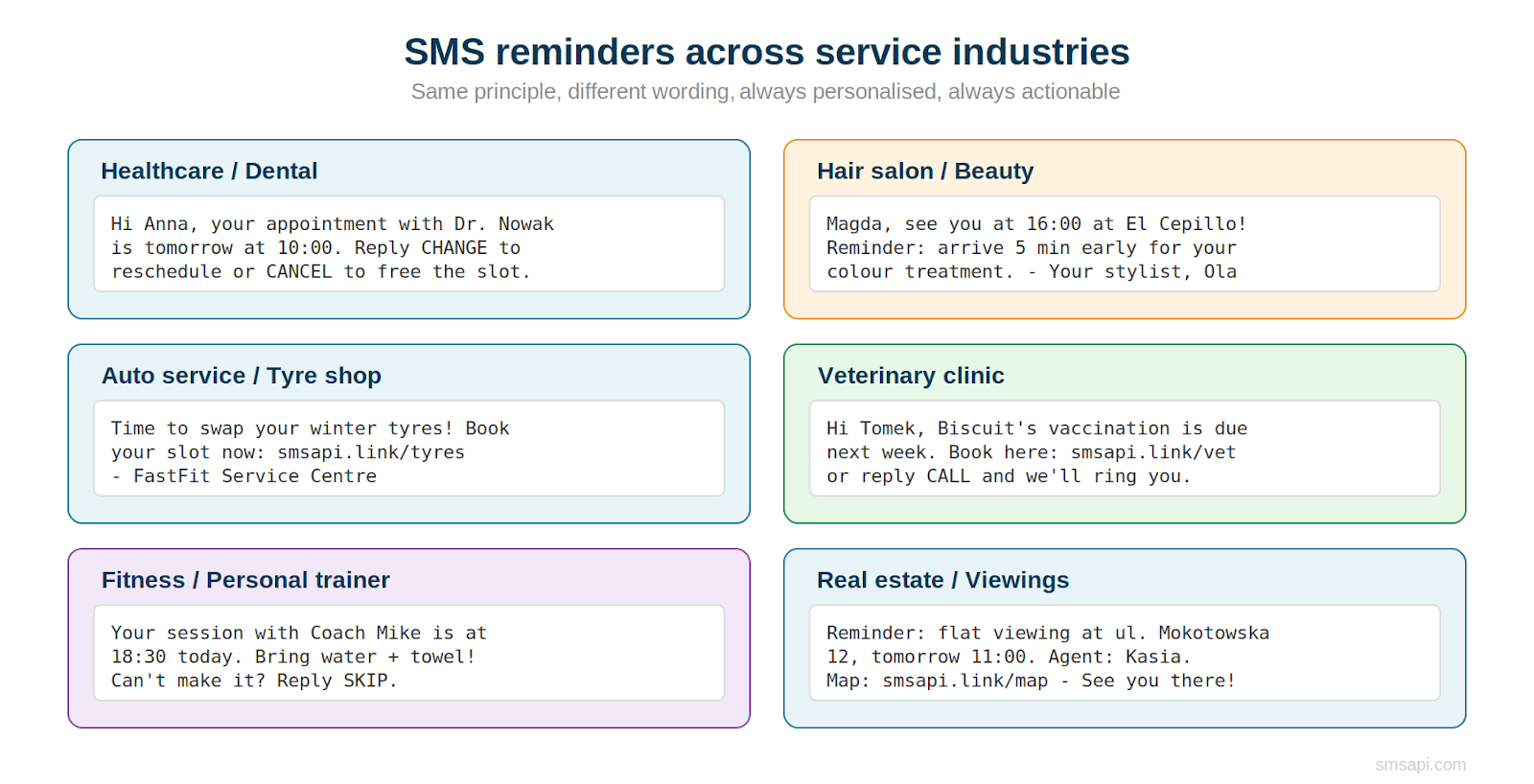
Notice the common elements: every message includes the date and time, the service provider’s name, and an action the customer can take (confirm, cancel, reschedule). Personalisation – using the customer’s first name, their pet’s name, the specific service they booked – isn’t decoration. It measurably increases engagement. SMSAPI’s personalisation parameters make this straightforward: just use placeholders like [%first_name%] in your templates, and the system fills them automatically. For a deeper dive into this topic, see our e-commerce SMS guide which covers personalisation mechanics in detail.
GDPR and consent: what you need to know
Here’s the good news: appointment reminders are classified as transactional SMS in most jurisdictions, which means they don’t require separate marketing consent. You’re providing information that the customer needs in order to use a service they’ve already booked. This is fundamentally different from promotional SMS, which does require explicit opt-in under GDPR.
GDPR rules to follow
- Collect the phone number as part of the booking process – this is the natural and expected moment.
- Be transparent about how the number will be used: ‘We’ll send you SMS reminders about your appointments.’
- If you want to add marketing messages (promotions, loyalty offers) to the mix, you’ll need a separate marketing consent checkbox.
- Always provide an easy opt-out. SMSAPI’s opt-out system lets customers unsubscribe from marketing messages with a single reply.
The distinction between transactional and marketing SMS is important. A reminder saying ‘Your appointment is tomorrow at 10:00’ is transactional. A message saying ‘Book your next appointment and get 20% off’ is marketing. Both are valuable, but they live under different consent rules. Read more about the nuances in our SMS marketing ABC guide.
Two-way SMS: let customers confirm, cancel, or reschedule by text
One-way reminders reduce no-shows. Two-way reminders reduce no-shows and recover slots. When a customer replies ‘CANCEL’ or ‘CHANGE’ to your reminder, your system can immediately free that appointment slot and offer it to someone on the waiting list. That’s revenue saved, not just revenue protected.
Setting up two-way SMS in SMSAPI requires a Virtual Mobile Number (VMN) – either a long code (9 digits) or a short code (4–5 digits). For most service businesses, a long code is sufficient and cost-effective. You can set automated replies (‘Your appointment has been cancelled. To re-book, visit [link]’) or route incoming messages to your email or CRM.

Practical example
A physiotherapy clinic sends a 48-hour reminder with ‘Reply OK to confirm or CHANGE to reschedule.’ Of the patients who receive the message, 62% reply OK (giving the clinic certainty), 8% reply CHANGE (allowing the slot to be re-filled), and 4% reply CANCEL (same). The remaining 26% don’t reply – but the no-show rate among that group is still lower than without any reminder, because the message itself served as a prompt.
What to do with the data
Two-way replies aren’t just operational – they’re data. Track which customers consistently confirm (your most reliable segment), which frequently reschedule (they may need more flexible booking options), and which never reply (consider a phone call for high-value appointments). Over time, this data lets you optimise your booking flow: overbooking high-risk slots, adjusting reminder timing, and segmenting customers by behaviour. More advanced teams layer in SaaS predictive analytics to forecast no-show probability and automate decision-making at scale.
For service businesses with more complex operations, this data can also feed into financial workflows – for example, syncing appointment outcomes with tools like Rillion’s invoice management software to improve billing accuracy and reduce revenue leakage from missed or late-cancelled bookings.
You can also use two-way SMS for post-appointment feedback, turning a simple ‘Rate 1–5’ reply into a lightweight NPS system. Customers who reply with a 4 or 5 get an automatic follow-up asking for a Google review. Customers who reply with a 1 or 2 get routed to a manager for service recovery. All of this is scriptable through SMSAPI’s automated reply feature and callback mechanism.
Five mistakes to avoid with appointment SMS
- Sending only one reminder. A single message helps, but a structured sequence (confirmation + 48h + day-of) outperforms it significantly. The day-of reminder alone catches the largest group of forgetful clients.
- Using a random number instead of a branded sender. A message from ’48 502 XXX’ gets ignored or flagged as spam. A message from ‘ElCepillo’ or ‘DrNowak’ gets read. SMS branding is free in SMSAPI – there’s no reason not to use it.
- Not offering a way to reschedule. If your reminder only says ‘Don’t forget your appointment’, a customer who can’t make it has two options: show up reluctantly or simply not show. If you add ‘Reply CHANGE to reschedule’, you recover the slot instead of losing it.
- Sending reminders at the wrong time. A reminder at 11 PM is intrusive. A reminder at 6 AM is annoying. Stick to business hours, and time day-of reminders for 2–3 hours before the appointment – enough lead time to act on, close enough to feel urgent.
- Ignoring the post-visit window. The moment after a successful appointment is the highest-engagement moment in the customer lifecycle. A quick ‘Thank you’ SMS with a re-booking link or feedback prompt turns a completed transaction into a loyalty touchpoint. Most service businesses waste this moment entirely.
Test SMSAPI
Create a free account at SMSAPI and test the professional SMS gateway for companies.
How to set this up in SMSAPI
You don’t need to be a developer to send appointment reminders, though having API access unlocks the most powerful automation. Here are your three options, each suited to a different scale of operation. For a complete walkthrough, see our guide on the three ways to send SMS.
Option 1: Customer Portal (no coding). SMSAPI’s web-based dashboard lets you create message templates, schedule sends, manage contacts, and track delivery – all from a browser. Upload your appointment list as a CSV, set the send time, personalise with parameters, and go. Best for businesses with a small number of daily appointments.
Option 2: Ready-made integrations (low/no coding). SMSAPI integrates with over 200 systems – including CRMs, booking platforms, and marketing automation tools. If your booking software supports webhooks or has an SMSAPI plugin, you can automate the entire reminder sequence without writing a line of code.
Option 3: API integration (full automation). For larger operations or custom booking systems, SMSAPI’s REST API lets you programmatically send SMS triggered by events in your system. When a booking is created, the API fires a confirmation SMS. When the appointment is 48 hours away, another trigger fires. Libraries are available for PHP, Java, JavaScript, Python, and C#.
Whichever path you choose, the setup takes less than a day for most businesses. A free test account includes complimentary messages to verify the flow before you commit.
Measuring what matters
Once your reminder sequence is live, track three things. First, your no-show rate – compare the before and after. If you were at 23% and drop to 14%, you know exactly what the reminders are worth in recovered revenue. Second, your reply rate for two-way messages (confirmations, cancellations, reschedules) – this tells you how engaged your customers are with the channel. Third, your re-booking rate from periodic reminders – this is the long-term revenue metric. For a complete framework on SMS campaign measurement, see our guide to SMS marketing KPIs.
SMSAPI’s analytics dashboard and delivery reports give you visibility into delivery rates, message status, and engagement – all exportable for reporting.
One approach that works well: create a simple spreadsheet tracking weekly no-show rate, confirmation reply rate, and re-booking conversion from periodic reminders. After one month, you’ll have enough data to calculate the exact ROI of your SMS reminder investment. Most service businesses find that reminders pay for themselves within the first week and you’ll have more data in your CRM for when e.g. someone interacts with you through a voice AI call center.
If you want to go further, add UTM parameters to the links in your SMS messages and track traffic in Google Analytics. SMSAPI’s built-in link shortener (cut.li) handles this natively – shorten the URL, append UTMs, and monitor which messages drive the most clicks and conversions.
160 characters that save thousands
Appointment reminders aren’t glamorous. They won’t go viral on social media or win a marketing award. But for service businesses, they might be the single highest-ROI communication investment you’ll ever make. A sequence of five automated text messages – confirmation, reminder, day-of nudge, feedback request, and re-booking prompt – reduces no-shows, recovers cancellation slots, collects customer feedback, and drives recurring revenue. All for the cost of a few cents per message.
Test SMSAPI
Create a free account at SMSAPI and test the professional SMS gateway for companies.
Register a free SMSAPI test account, set up your first reminder template, and see the impact within a week. Your empty Thursday-at-four slot will thank you.